
Sharing is caring!
Most “background effects” collections are videos. This one isn’t.
Every demo below is running in a canvas on this page, drawn frame by frame by about 600 lines of vanilla JavaScript — no Three.js, no GSAP, no MP4 files, no library from a CDN. I built these eight because I wanted backgrounds that feel slightly wrong: the kind of thing a visitor stops scrolling to poke at. Move the cursor. Hold it down. Some of them react, one of them remembers.
They also know when to shut up. Each animation pauses when it leaves the viewport, the pixel ratio is capped, and prefers-reduced-motion gets a static frame instead of a loop.
How to play
- Move the cursor over a demo — most effects are pointer-reactive.
- Hold the pointer down to push the effect harder (glitch, shatter, liquid metal).
- Click the shattered glass to blow it apart; it rebuilds itself.
- On a phone, touch works the same way.
1. Liquid metal that leans into your cursor
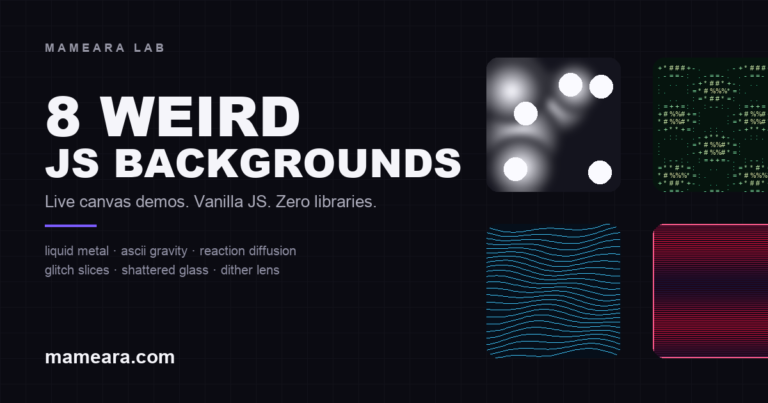
Nine radial gradients drift across a black canvas, and one CSS line does the rest: filter: blur(11px) contrast(15). The blur fuses the blobs, the contrast turns soft grey into a hard chrome edge. The pointer pulls the nearest mass toward it, and holding the pointer makes everything move faster.
2. ASCII gravity
A monospace grid samples a field of three sine waves, then bends the sampling coordinates around a gravity well at the cursor. Nothing is physically simulated — the characters just look like they are orbiting a small black hole. This is the effect people try to touch first.
3. Topographic pulse
Forty stacked polylines, each displaced by layered sine waves with a different phase. Under the cursor a radial dent pushes the lines down, so the surface looks like it is breathing around your hand. Cheap to draw, surprisingly convincing.
4. Glitch slices
A hue-shifting gradient is copied in horizontal slices with random offsets, plus the occasional one-pixel white scanline. Hold the pointer and the slice count and displacement double — the effect goes from “broken monitor” to “signal lost”.
5. Shattered glass
Forty-eight triangles, each vertex on a spring. The cursor pushes vertices away from it and the springs pull them home; a click fires a bigger impulse and the whole pane reassembles itself. It is a simple mass-spring system wearing a glass texture.
6. Reaction diffusion
This one is actually alive. A Gray-Scott reaction-diffusion system runs on a 200×120 grid — two chemicals, four neighbours, one feedback loop — and the cursor injects the second chemical wherever you move. The cells keep growing after you stop.
7. Cursor nebula
380 particles orbit the pointer at different radii, speeds and hues. Additive blending plus a low-alpha black fill each frame gives the trails; no particle history is stored, which keeps it cheap. Move fast and the edges smear.
8. Dither lens
A smooth gradient is reduced to one bit with a 4×4 Bayer matrix — the entire scene becomes black and cream. The only place the real colour exists is a circular lens around the cursor, which is why it looks like a window cut into an old Mac.
Why canvas instead of a looped video
A 4-second 1080p background loop is 3–8 MB and it is still the same four seconds. These effects are a few kilobytes of JavaScript, they react to the visitor, and they scale to any screen without a second encode. The trade-off is CPU: a canvas that runs forever is a battery tax, which is why every demo here stops when it is off-screen.
The four rules that keep this page fast
- Only draw what is visible. An
IntersectionObserverstarts a demo when it is 220px away and stops it when it leaves. - Cap the pixel ratio.
Math.min(devicePixelRatio, 1.5)— retina-level sharpness without four times the fill rate. - Throttle the expensive ones. Text and line effects run at 30fps, pixel effects at their own pace.
- Respect reduced motion. With
prefers-reduced-motionthe canvas paints one still frame and never starts a loop.
Want the source? The whole lab is one unminified file: bg-lab.js. Use it, break it, ship it. A link back is nice but not required.
Frequently asked questions
Do these effects work on phones?
Yes. They use pointer events, so touch drags behave like a mouse, and the demos switch to a 4:3 frame on small screens to keep them usable without eating the whole viewport.
Can I use this code on a client site?
Yes — the code is original and free to adapt. Keep the attribution if you can, and test on the target devices before shipping. The reaction-diffusion demo is the heaviest of the eight.
Why not WebGL or Three.js for all of them?
Because most of these ideas do not need a shader. Canvas 2D is smaller, works everywhere, and is easier to explain in a few lines. WebGL earns its place when you need per-pixel distortion or real 3D — the glitch and liquid-metal demos get that look with compositing and CSS filters instead.
How do I add one to a WordPress post?
Drop a container like <div class="bg-lab-demo" data-effect="metal"></div> into the content and enqueue the script. The script finds every container, creates the canvas and picks the effect by data-effect.
If you build something with one of these, send it over — I keep a folder of the strange ones. More front-end experiments live in the frontend development archive, and if you are shopping for tools, start with the AI front-end design tools roundup.

